How I built AppSend.dev
- Published on
Updated Jan 5, 2025
A year later, AppSend has grown quite a bit:
- 7,340+ builds shared through the platform
- 500+ registered users
- Teams from companies like
- Siemens Energy
- Polaris ($5B valuation)
- MTN ($17B market cap)
- Valtech ($1.4B valuation)
- Runwise ($95M raised)
have been using it, along with many other teams from fintech, healthcare, gaming industries and many non-profits.
Not bad for a winter break project that started as a solution to my own frustration with existing tools!
Overview
Another Christmas break started and I needed a project I could complete in the next few weeks. I had this idea in the back of my mind for a while now - I've been working on a React Native mobile app at work, and dev build sharing between devices was pretty painful.
Expo has a nice option to share builds when you use their cloud - but those are good for staging (and require you to use their cloud). For dev builds you have to use a 3rd party service. Sure, technically Android builds can be installed by just opening the APK on the device. But iOS can't - in order to install a dev IPA, it has to be opened via a special URL on a webpage, only then it triggers the proper install process on the device. As for Android, you still need a way to get the build to the device - quickly and without friction.
After doing some research I found a few options, one of which is Diawi - a popular service for exactly this.
The issue with Diawi is that it has very strict limitations, you have to pay if you want to upload files >75MB, retention is only 3 days on free tier and max 20 installs per app. Another big issue for me was its UI/UX - way too complex and messy.
So I decided to create a free alternative with focus on User/Developer Experience. I figured if I'm going to solve this for myself, might as well make it available for everyone.
Requirements
I created a list of requirements that would make me a user of a service like this:
- service must be free (just making something useful for myself and fellow devs)
- generous limit on file size, 250mb should do it (storage is very cheap nowadays)
- dead-simple API that can be used from CI/CD scripts to upload builds
- support for iOS and Android builds
- at least 30 days of file retention
- no limits on installs (again, they are basically free nowadays)
- and last but not least - super simple and easy to use modern-looking UI
Let's get to work!
Tech stack
I went with my usual tech stack, as the best tech stack is always the one you know best:
- Python + FastAPI on backend
- NextJS on frontend
For infrastructure, I went with my battle-tested self-hosted setup I use for most of my projects:
- Hetzner Cloud (powerful and cheap VMs - we are running for free)
- Resend for emails
- Vercel for frontend deployment
- Kamal for backend deployment of our docker image to Hetzner VM
- Database is hosted in private network on Hetzner
- Postgres with scheduled pg_dump for DB backups
- Cloudflare R2 for cheap S3 storage and unlimited free bandwidth
- Mintlify for docs
I can already hear you thinking - database is the most critical part of infra, you must use a managed DB otherwise it's only a matter of time until you regret!
The choice of whether a database should be managed or not heavily depends on your exact application and experience. I've been self-hosting Postgres for many years now - the biggest instance had around 300GB of data and ran without issues for 5 years until the app was closed. So you can get very far with out-of-the-box settings of Postgres (except a few minor config changes to better utilize server RAM).
In our case there is no mission-critical data and backups are created every 4 hours - so in the worst-case scenario only a few sharable links to builds will be lost. But even those can be restored as actual files are safely stored in Cloudflare.
Anyway, this is a completely free service - I try to make it as reliable as possible without breaking the bank. With the current setup based on my previous apps hosted in the same way, I don't anticipate any issues for years to come unless the load on the app increases by orders of magnitude. But when it happens - there is a clear migration path.
Building the thing
As often in these cases, we start with developer experience first, as this tool is mostly for developers.
We need a single endpoint to upload a build - v1/upload. The payload must include only the absolutely necessary data:
- build file
- optional message to describe changes in the build for users that will test it
- optional list of tester emails that should receive a link with this build
The type of build (iOS or Android) will be derived automatically on the backend from the uploaded file.
Let's model how it should look in cUrl:
curl https://api.appsend.dev/v1/uploads/ \
 -F file=@build.ipa \
 -F message="Short build description" \
 -F testers="[email protected], [email protected]"
Nice and simple. Python should also work in a similar way:
import requests

url = 'https://api.appsend.dev/v1/uploads/'
files = {'file': open('build.ipa', 'rb')}
data = {
  'message': 'Short build description',
  'testers': '[email protected], [email protected]'
}

response = requests.post(url, files=files, data=data)
data = response.json()

print(f"Install url: https://appsend.dev/i/{data['uid']}")
Validation of file size happens during upload - as soon as uploaded portion hits file size limit it is aborted.
We also have to validate file type - if this is really APK/IPA. If yes - we want to extract some useful data like app's icon (so we can nicely show it in sharable link), app's name and size, used permissions etc.
For Android build, I used AndroGuard:
from androguard.core.apk import APK

apk = APK(temp_file_path)

package_name = apk.get_package()
version = apk.get_androidversion_name()
permissions = apk.get_permissions()
activities = apk.get_activities()
app_name = apk.get_app_name()
app_icon = apk.get_app_icon(max_dpi=700)
version_code = apk.get_androidversion_code()
For Apple builds we will use Python's built-in plistlib module. The actual build is just a zip archive that we will open using another built-in Python module zipfile:
import plistlib
import zipfile

with open(
    f"{tempdir}/Payload/{app_name}/Info.plist", "rb"
) as plist_file:
    plist_data = plistlib.load(plist_file)
    bundle = plist_data.get("CFBundleIdentifier")
    version = plist_data.get("CFBundleShortVersionString")
    bundle_name = plist_data.get("CFBundleName")
    display_name = plist_data.get("CFBundleDisplayName")
    build_code = plist_data.get("CFBundleVersion")
Having extracted all the info we need from the build - we store this in DB and return upload data with uid:
# For Android builds
metadata = ApkMetadata(
    package=package_name,
    version=version,
    version_code=version_code,
    permissions=permissions,
    activities=activities,
    min_sdk_version=min_sdk_version,
    app_name=app_name,
    testers=testers_list,
)

# For iOS builds
metadata = IpaMetadata(
    bundle=bundle,
    version=version,
    version_code=build_code,
    bundle_name=bundle_name,
    display_name=display_name,
)

db_file = models.AnonFile(
    file_name=file.filename,
    file_size=bytes_size,
    file_type=file_format,
    meta=metadata.model_dump(),
)


db.add(db_file)
db.commit()
After the build is processed, the build file and its icon are uploaded to Cloudflare R2.
Naturally we want to set up auto deploy every time we merge changes into main. Kamal is used to deploy the backend docker image to the Hetzner VM. Let's write a GitHub Workflow that will do this:
name: Kamal deploy

on:
  push:
    branches:
      - main

jobs:
  Deploy:
    runs-on: ubuntu-latest

    env:
      DOCKER_BUILDKIT: 1
      KAMAL_REGISTRY_PASSWORD: ${{ secrets.KAMAL_REGISTRY_PASSWORD }}
      KAMAL_REGISTRY_USERNAME: ${{ secrets.KAMAL_REGISTRY_USERNAME }}
      BASE_URL: ${{ secrets.BASE_URL }}
      DB_HOST: ${{ secrets.DB_HOST }}
      DB_NAME: ${{ secrets.DB_NAME }}
      DB_PASS: ${{ secrets.DB_PASS }}
      DB_PORT: ${{ secrets.DB_PORT }}
      DB_USER: ${{ secrets.DB_USER }}
      ENV: ${{ secrets.ENV }}
      S3_ANON_ACCESS_KEY: ${{ secrets.S3_ANON_ACCESS_KEY }}
      S3_ANON_BUCKET_NAME: ${{ secrets.S3_ANON_BUCKET_NAME }}
      S3_ANON_ENDPOINT_URL: ${{ secrets.S3_ANON_ENDPOINT_URL }}
      S3_ANON_SECRET_ACCESS_KEY: ${{ secrets.S3_ANON_SECRET_ACCESS_KEY }}
      RESEND_API_KEY: ${{ secrets.RESEND_API_KEY }}

    steps:
      - name: Checkout code
        uses: actions/checkout@v3

      - name: Set up Ruby
        uses: ruby/setup-ruby@v1
        with:
          ruby-version: 3.2.2
          bundler-cache: true

      - name: Install dependencies
        run: |
          gem install kamal -v 1.0.0

      - uses: webfactory/ssh-agent@v0.7.0
        with:
          ssh-private-key: ${{ secrets.SSH_PRIVATE_KEY }}

      - name: Set up Docker Buildx
        id: buildx
        uses: docker/setup-buildx-action@v2

      - name: Run deploy command
        run: kamal deploy
Nice and simple!
Frontend
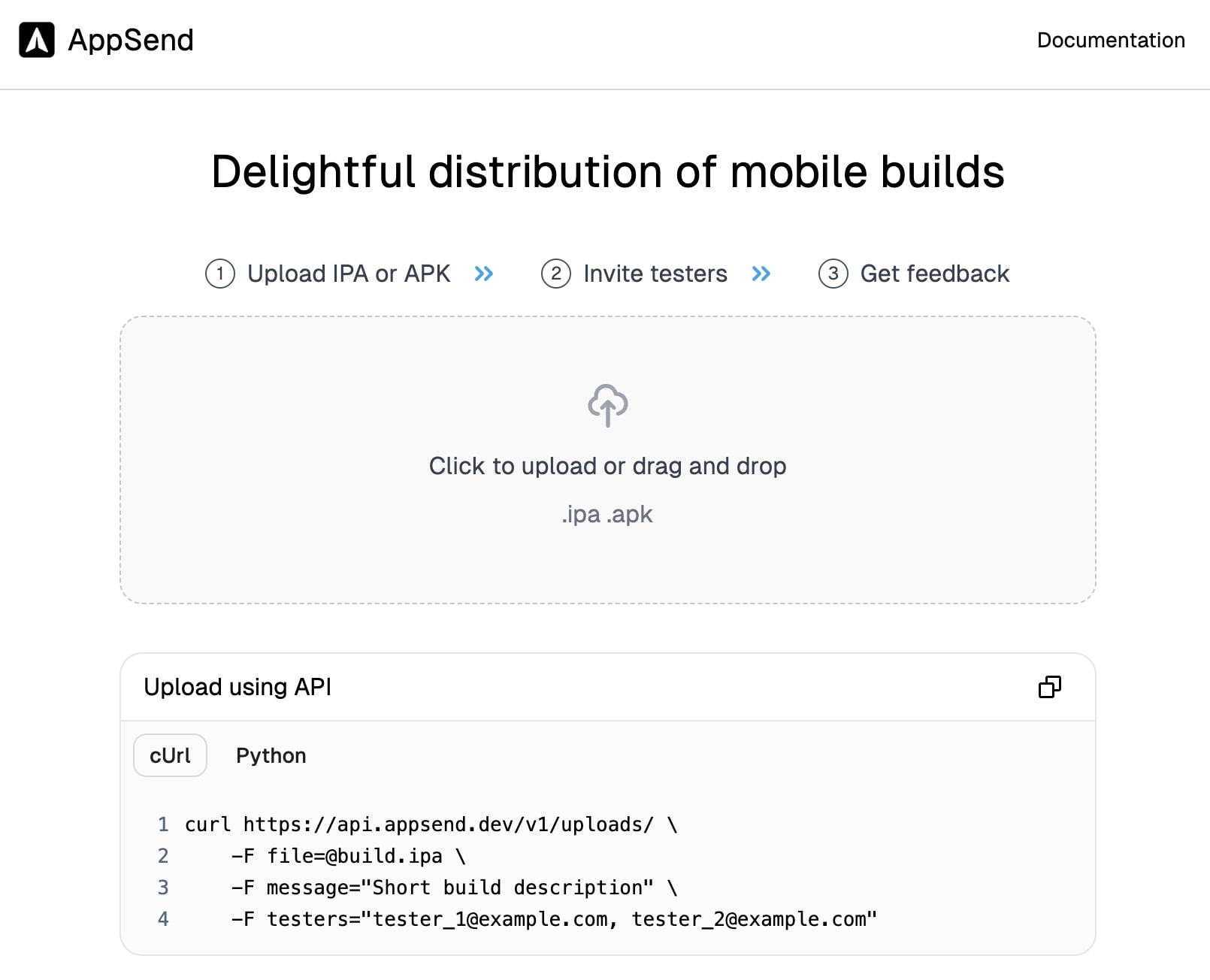
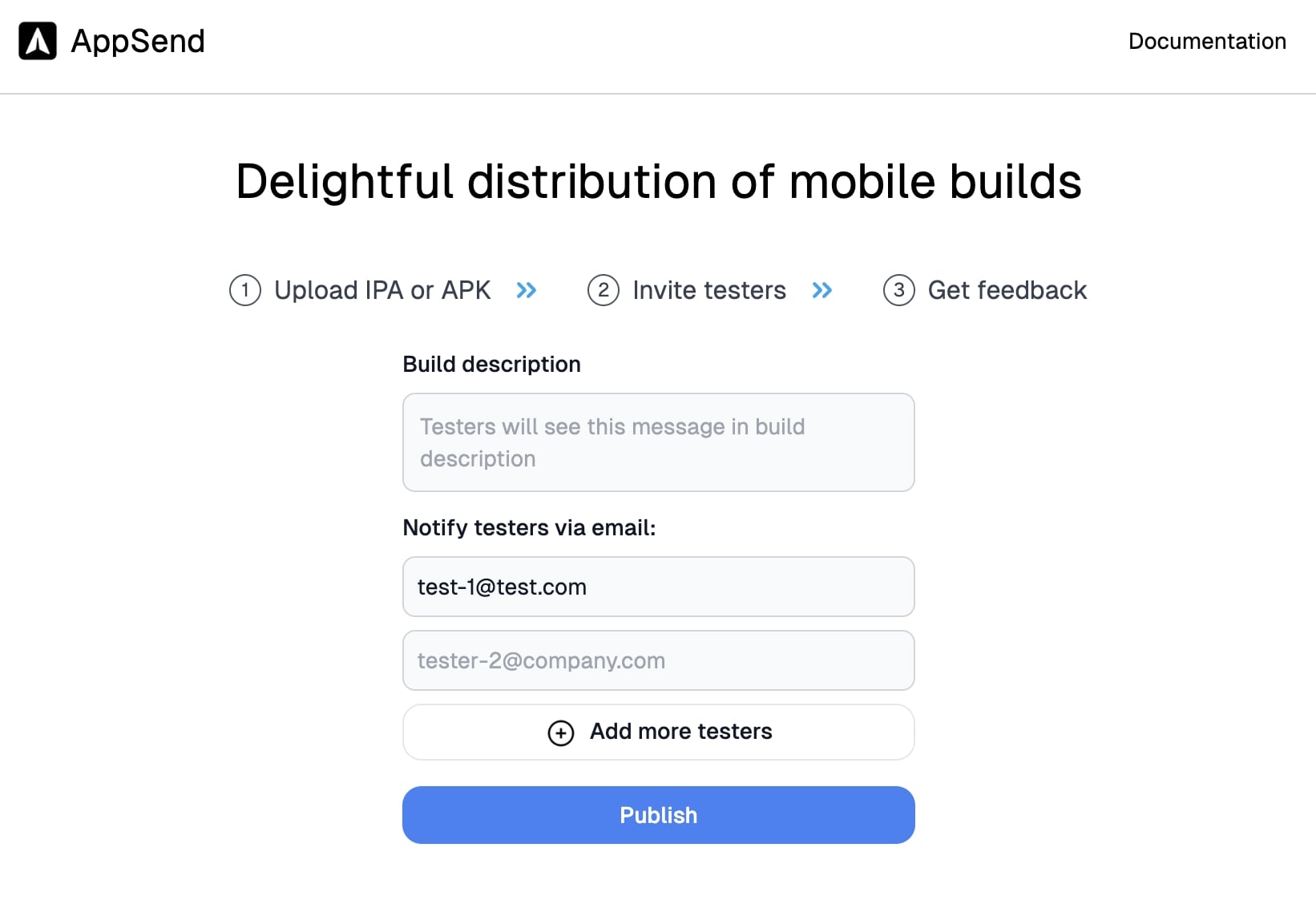
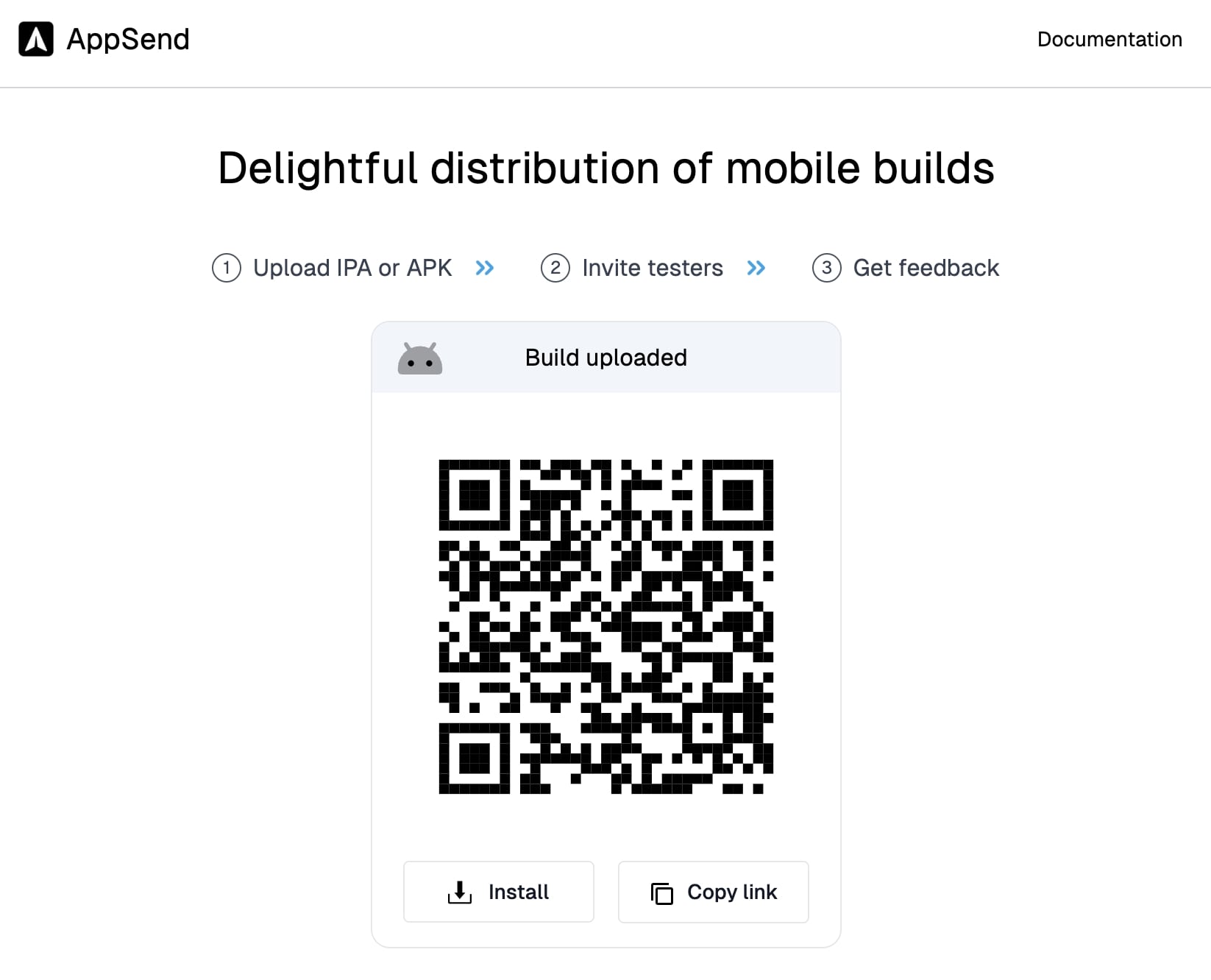
Now we have API in place, time to add frontend. I used NextJS as I worked with it extensively before. All we need here is one page with a few forms:
- Upload build
- Enter optionally message and add testers' emails
- Get sharable link and QR code so testers can scan it as an alternative to emailed link (often can be faster and more convenient)
We also need some way to clearly communicate to users how many steps they have to take to achieve their goal.
And as our users are mostly developers, and we have only one endpoint - it only makes sense to show an interactive code snippet that you can copy and use right away without diving into docs.
This is how it turned out:
To sum up
This was a relatively simple project, but it took a few weeks to make it nice and polished.
The best part?
Just a few weeks after release, I noticed teams from some huge companies using it on a weekly basis!
So if you are looking for a simple way to share mobile dev builds - look no further!
AppSend is free and unlimited: appsend.dev